| |
Shared libraries
Shared libraries, unlike static ones, are not compiled into the application binaris. They are loaded into the memory and linked with the application at a run time. Other running codes can use the loaded shared libraries.
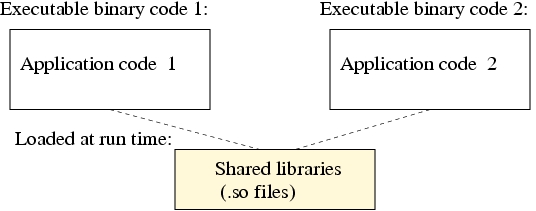
Building a shared library
To compile the application with the library we would follow the step below:
To see what the shared libraries the code needs, use ldd command
If the library is not found, include it into LD_LIBRARY_PATH environment variable, for example:
Alternatively the shared library path can be included into
/etc/ld.so.conf. After /etc/ld.so.conf has been updated,
we need to run command
Exercise
Get the list of shared libraries required by command, ls:
Compile code.c with the Math shared library (default compilation):
Get the list of shared libraries required by code_stat.x, and code_shared.x:
Compare the sizes of the executable files:
|
|